
Custom Investor CRM: A Guide for Reg CF and Reg A+ Issuers
A custom investor CRM gives a Regulation CF or Regulation A+ issuer one place to organize investor segments, pipeline stages, workflow progress, and team coordination. It can be configured around the issuer’s processes, though activity inside an investor portal may not be visible in an external CRM. The CRM supports coordination and reporting; it does not replace the portal or securities counsel.
Keeping marketing, investor relations, and operations aligned takes more than a contact list. Teams need a shared view of investor engagement and campaign progress, with clear handoffs between the people managing each part of the raise.
This guide covers what a custom system can organize, how to map stages and data needs, and what to weigh when choosing an approach. It also explains how existing tools affect setup and where lead scoring and attribution tracking fit. Results vary, and no marketing approach guarantees a raise will close.
Key Takeaways
- Separate investor engagement tracked in your CRM from accreditation, identity checks, document completion, and funding activity handled inside the investor portal.
- Build investor segments around useful differences, such as engagement, source, or current stage, then use filters to guide relevant follow-up.
- Define pipeline stages with clear entry and exit criteria so teams can see what has happened and what action comes next.
- Map handoffs among marketing, investor relations, and operations, including which systems hold each piece of information.
- Shape the CRM around your team’s workflow and reporting needs, while keeping legal decisions with qualified securities counsel.
Accreditation, KYC/AML, and document-signing progress
Investor activity inside a portal may be difficult to see in an external CRM. Deal-room views, accreditation steps, document completion, and funding activity may remain in the portal instead of syncing to issuer records. For a Regulation CF or Regulation A+ raise, keep the team’s follow-up view distinct from the portal’s transaction records. This prevents staff from mistaking an email response for proof that a portal task is complete.
A custom investor CRM can record operational checkpoints without determining whether an investor qualifies or whether an issuer has met its obligations. A record might show that an investor was directed to the issuer’s registered intermediary, started a portal process, or needs follow-up. Keep sensitive documents and official status records in their designated systems. Use the CRM to identify who owns the next internal task.
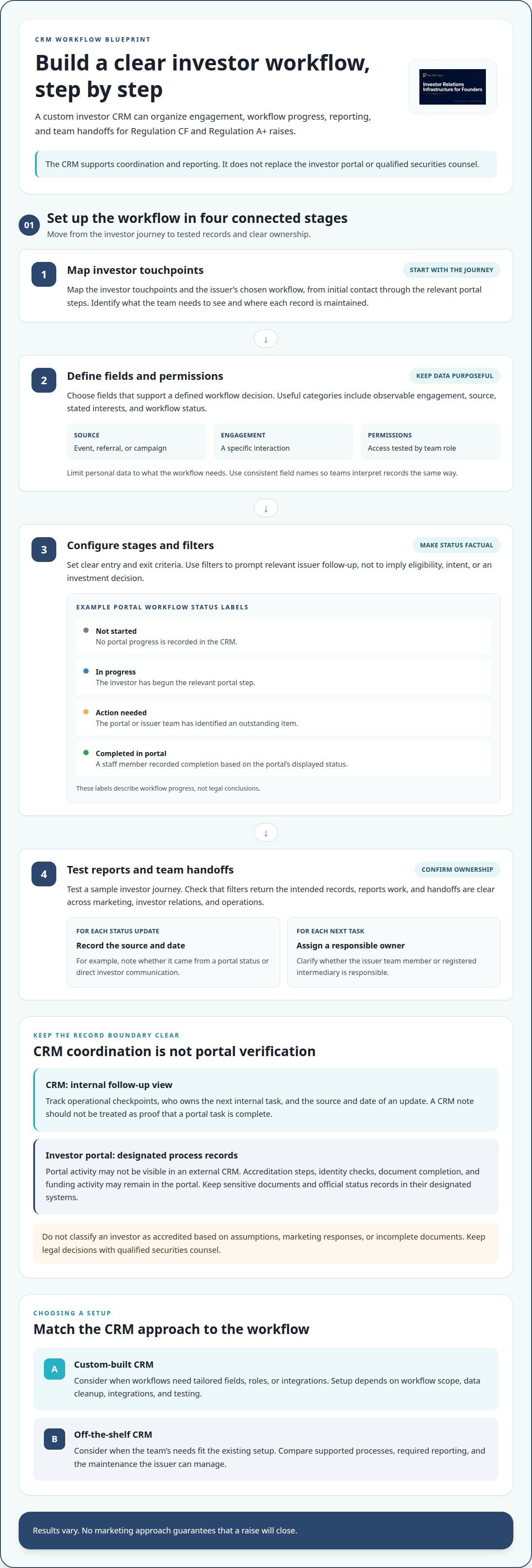
Build a simple status map for each workflow. Keep labels factual and consistent across the team:
- Not started: The CRM contains no recorded portal progress.
- In progress: The investor has begun the relevant portal step.
- Action needed: The portal or issuer team has identified an outstanding item.
- Completed in portal: A staff member has recorded completion based on the portal’s displayed status.
These labels describe workflow progress, not legal conclusions. Record the source and date of each update, such as a portal status or direct investor communication. That context helps teammates distinguish verified portal activity from an unconfirmed note.
For accreditation tracking, treat the CRM as a coordination layer. It can show whether an investor was directed to the relevant portal step and whether the issuer team has a follow-up task. It should not classify an investor as accredited based on assumptions, marketing responses, or incomplete documents. Qualified securities counsel should guide legal decisions about the issuer’s process and applicable requirements.
The same distinction applies to KYC/AML and signatures. KYC/AML means know your customer and anti-money laundering. A tracker may show that an investor started identity verification, that the portal lists an item as pending, or that a signature step appears complete. It should not replace portal records or the issuer’s approved procedures. Avoid copying identity documents into general CRM notes when the portal is the designated record system.
For SEC-related compliance coordination, record responsibilities, outstanding tasks, and the source of each status update. Review the workflow with qualified securities counsel, and assign each internal task to the issuer team member or registered intermediary responsible for it. Clear ownership prevents a portal checkpoint from being mistaken for a completed internal review or legal determination.
Custom investor segments and workflow filters
Segments make investor records useful for follow-up, not just storage. Choose filters that support a defined decision, such as identifying which group needs an update.
Investor Segmentation
Group records by observable engagement, source, stated interests, or workflow status. For example, a team might filter for people who attended a webinar, opened an issuer email, or began an offering-page process. Tie each segment to a clear next step, such as sending approved campaign information or assigning investor relations follow-up. Avoid assumptions about an investor’s eligibility or intent.
Use consistent field names so marketing and investor relations teams interpret segments the same way. A “source” field might record an event, referral, or campaign, while an “engagement” field captures a specific interaction. Review filters when the issuer changes its outreach plan. Remove fields that no longer inform a decision, and limit personal data to what the workflow needs.
Custom-Build Decisions
A custom investor CRM suits workflows that need tailored fields, roles, or integrations. An off-the-shelf CRM may suit teams whose needs fit its existing setup. Compare the processes each option supports, the reporting required, and the maintenance the issuer can manage.
To build step by step, map investor touchpoints, define fields and permissions, configure stages and filters, then test reports and team handoffs. Launch timing depends on workflow scope, data cleanup, integrations, and testing. Complex connections require more coordination than a basic configuration.
Workflow filters should prompt actions, not imply investment decisions. A segment based on expressed interest can guide relevant issuer outreach, while incomplete portal activity can prompt an internal task. Make the distinction clear in field names and team guidance. For example, “requested information” is clearer than “qualified lead” when no qualification process has occurred.
Funding-triggered workflows need a defined event and owner. The CRM can prompt an issuer team task when the registered intermediary’s records show a relevant funding status. The task might be to update an internal report or coordinate a post-investment communication. Treat the intermediary’s status as the source, and do not mark a record funded based only on an email or verbal update.
Common implementation risks include duplicate records, vague stage definitions, excessive data collection, and unclear permissions. Assign someone to resolve duplicates, define what evidence changes a status, and test access using representative team roles. Have qualified securities counsel review legal decisions and related procedures.
Before launch, test a sample investor journey from initial contact through the issuer’s chosen workflow. Confirm that filters return the intended records, funding-related tasks have an owner, and reports distinguish CRM notes from intermediary records.
Custom pipeline stages and lead progression
A pipeline should show the next operational step, not suggest investment intent. For a Regulation CF or Regulation A+ raise, define each stage by an observable action, its owner, and the event that changes the record.
Start with the issuer’s actual journey. A contact might enter after requesting information, then receive approved campaign materials, visit the offering page, or begin a portal process. These are separate events. A CRM stage should reflect the recorded event, not an assumption about what the person will do next.
For example, a practical sequence could include:
- New contact: A record has been created, with its source and assigned owner.
- Information requested: The person has asked for details, and the issuer team has a follow-up task.
- Engaged: A recorded interaction, such as an event attendance or reply, gives the team context.
- Offering-page activity: A visit or portal sign-up is recorded only when the relevant system provides that information.
- Portal process underway: The registered intermediary’s portal shows an active investor process.
- Completed or inactive: The record reflects a portal status or a documented decision to pause follow-up.
Keep CRM stages distinct from portal milestones. An issuer may know someone received an email without knowing whether that person completed a portal step. Record the source of each update, such as a CRM interaction or intermediary status, so the team can interpret it correctly.
Stage updates need clear rules. For each transition, define the qualifying event, the responsible person, and the information required. For instance, move a record to “Information requested” after a logged request, not after an email open. If an event cannot be observed reliably, use a task or note rather than presenting it as a completed milestone.
Assign one owner to each next action. A marketing team member might log an event response, while investor relations handles a requested follow-up. The pipeline should make the handoff visible without treating marketing engagement as a compliance status or investment decision. Qualified securities counsel should guide legal decisions and related procedures.
Review stage definitions against real records before launch. If two team members classify the same interaction differently, clarify the entry rule. Remove stages that do not support a decision, and use an inactive or paused status when follow-up stops. This keeps reporting useful without implying progress the record does not show.
A custom investor CRM can reflect these issuer-specific transitions, while a standard pipeline may suit a simpler process. To map stages and owners with your team, schedule a workflow discussion.
Coordination across marketing, investor relations, and operations
The right CRM platform depends on the issuer’s workflow, existing tools, and reporting needs. Choose one that supports clear team handoffs and fits how the issuer coordinates its Regulation CF or Regulation A+ raise.
Coordination starts by giving each system a clear role. A CRM can organize contact history and internal tasks, a marketing tool can manage campaign activity, and the registered intermediary’s portal can record investor actions. For example, an email response can prompt an investor relations task without being treated as a completed portal step.
Map handoffs before configuring fields or integrations. Identify who owns each action, what information they need, and which system records the source event. If marketing logs an event response, investor relations can receive the relevant context. Operations can then update internal reporting without treating that response as a transaction record.
A shared workflow can clarify responsibilities across teams:
- Marketing: Records campaign source and engagement for issuer outreach.
- Investor relations: Uses that context to manage follow-up and questions.
- Operations: Maintains internal reporting and coordinates administrative tasks.
- Registered intermediary: Maintains the portal process and its investor activity records.
Integrations can connect a CRM with existing accounting, marketing, inventory, and communication tools. Choose connections to meet a specific need, such as transferring a campaign source into a contact record or making an internal task visible to its owner. Define which system is authoritative for each field. This reduces conflicting edits and keeps portal activity distinct from CRM notes.
Choose a platform after mapping the workflow, not before. An off-the-shelf system may fit when its fields, user roles, reports, and integrations cover the issuer’s process. A custom setup may suit teams that need different permissions, tailored reporting, or coordination across tools the existing process does not connect.
Test a realistic handoff before launch. Have a marketing team member record an interaction, assign investor relations follow-up, and confirm operations can see the required internal status. Check that source details remain intact and that a portal event is not represented as verified unless the registered intermediary’s records support it. Document the workflow so team members follow consistent steps.
For a Regulation CF or Regulation A+ issuer, design around team ownership and system boundaries. Keep outreach and campaign work clearly identified as work done for the issuer. Direct investors to the issuer’s registered intermediary or offering page, and leave legal decisions to qualified securities counsel.
The right CRM fits the issuer’s workflow, existing tools, and reporting needs, with clear team handoffs and suitable fields, permissions, reports, and integrations. Choose it after mapping responsibilities and identifying the authoritative system for each record, then test a realistic handoff before launch.
Pre-IPO Hype: Custom Investor CRM
Pre-IPO Hype provides investor relations infrastructure for Regulation CF and Regulation A+ raises. The company is not a broker-dealer, funding portal, or investment adviser, and does not offer or sell securities or make investment recommendations.
For issuers coordinating investor records and campaign activity, Pre-IPO Hype provides investor relations and marketing campaign support alongside the issuer’s registered intermediary and qualified securities counsel. Its Custom Investor CRM includes lead scoring and attribution tracking. Investor Relations and Marketing Campaigns support outreach carried out for the issuer.
This support can suit teams that need a clearer link between investor engagement and internal workflows. Keep portal activity and legal decisions within the appropriate processes, and direct legal questions to qualified securities counsel.
Contact Pre-IPO Hype to discuss campaign support for your Regulation CF or Regulation A+ raise.
Set Your Next Raise Up for Clearer Decisions
Turn your workflow into operating decisions: what information teams need, who maintains it, and how they use it. A custom investor CRM should support those decisions, not add unnecessary steps or obscure task ownership. Start by identifying the handoffs that matter most to your issuer, then prioritize the reports and processes that support them.
Keep the system’s role clear as you plan. It supports team coordination but does not replace the registered intermediary’s portal or qualified securities counsel. Legal decisions belong with counsel.
Thoughtful planning gives your team a practical foundation for the work ahead. Choose a next step that fits your process and move forward with clarity.
Your issuer’s next stage starts with a workflow built around its needs.
Frequently Asked Questions
What is a tailored investor CRM and who needs one?
A tailored investor CRM is a relationship-management system configured around an issuer’s fundraising workflow. It can suit founders whose teams need fields, reporting, or handoffs that standard contact management does not represent clearly. For example, a team coordinating marketing and investor relations might connect a contact’s source, assigned owner, and follow-up history in one record. Consider a tailored system when those requirements justify customization and ongoing ownership.
What features should an investor CRM include?
Prioritize features that make records useful for daily work: searchable contact profiles, source tracking, task ownership, communication history, and role-based access. A report might show which contacts have an assigned follow-up, while a duplicate check helps staff avoid splitting one person’s history across multiple records. Define fields with the people who will use them, then remove anything that does not support a decision or task.
How should an investor CRM track leads, deals, and investor communications?
Keep contact records, raise-related records, and communication logs connected but distinct. For each interaction, record its channel, date, owner, and a concise factual summary, such as “requested the presentation by email.” Do not treat a message or meeting as a commitment. Give every open task an owner and next action so teammates can understand the record without interpreting informal notes or relying on private inboxes.
What integrations should a custom investor CRM support?
Choose integrations based on existing issuer workflows, not a long feature checklist. A marketing platform might pass campaign source information to a contact record, while a communication tool might make relevant correspondence visible to authorized staff. Accounting systems can support internal reconciliation workflows. Define the authoritative system for each data field, and limit transfers to information teams need. Keep investor portal records governed by the intermediary’s processes.
What are investor CRM data security, privacy, and compliance requirements in the United States?
CRM configuration alone does not establish compliance. Map the data collected, who can access it, why the issuer uses it, and where records are maintained. For example, keep sensitive identity documents in their designated system rather than copying them into general notes. Document who reviews user access and handles security incidents. Ask qualified securities counsel to identify legal obligations and help shape the issuer’s procedures.
Best CRM platforms for investor relations and fundraising
A custom investor CRM suits workflows that need tailored fields, roles, or integrations. An off-the-shelf CRM can work when its existing setup meets the team’s needs. Compare the processes each supports, reporting requirements, and maintenance needs.
Disclaimer
Educational only. Not investment, tax, or legal advice. Pre-IPO Hype is investor relations infrastructure for Regulation CF and Regulation A+ raises. We are not a broker-dealer, funding portal, or investment adviser, and we do not offer or sell securities or make investment recommendations. Any securities offering is made only by the issuer, through its own offering documents and, where required, a registered intermediary.