
Investor Reporting Template: Guide & Key Metrics
An investor reporting template gives founders a consistent structure for explaining company performance, risks, and priorities. It connects business activity to its context so readers can see what has changed and what the team is focused on next.
Investors need more than a list of wins. They also need clear explanations of setbacks, changing assumptions, and decisions that may affect company plans. Presenting these points plainly keeps the update useful and grounded.
This guide explains what to include, how to discuss progress and challenges, and how to choose a format for sharing updates. It also covers how to tailor reports to readers and distribute them consistently.
Key Takeaways
- Build updates around company context, financial performance, key metrics, market conditions, and the next outlook.
- Pair progress with candid explanations of setbacks, their causes, and the steps being taken to address them.
- Choose an email, presentation, or shared workspace based on the detail your audience needs and how they’ll use the update.
- Customize each report for its readers, then make it easy to scan with clear headings, consistent formatting, and focused charts or tables.
- Set a repeatable reporting process so stakeholders can follow changes and understand what support would be useful.
What Are Investor Updates?
An investor update reports on a company’s performance, finances, risks, and plans. Founders, finance teams, and investor relations professionals use updates to inform shareholders and potential investors. A useful report connects current results to business priorities, helping readers understand what changed and why.
Choose a reporting cadence the team can maintain, and communicate it clearly. Keep the reporting period consistent from one update to the next. If the company has agreed to share information with shareholders, align the report with those commitments and include the relevant details.
Venture-backed reports often focus on product development, customer activity, hiring, burn, and runway. Real estate reports may emphasize property operations, occupancy, project milestones, and asset-level performance. Tailor the measures to the investment and explain how each relates to company or property goals.
For a monthly update, define the reporting period, gather current information, and compare results with the company’s plans. Explain meaningful changes, identify upcoming milestones, and make any request for support specific. Keep the structure familiar while updating the details to reflect current priorities.
Investors often need financial statements alongside operating measures. Summarize the income statement, balance sheet, and cash flow, then explain relevant figures in context. For a startup that isn’t profitable, monthly burn and remaining runway help describe its financial position. Define each metric consistently so readers can compare results.
Common mistakes include reporting only positive developments, changing metric definitions, and presenting figures without context. If burn rises after hiring, explain why and how it affects company plans. Label estimates clearly, and compare reported figures with company records before sharing.
- Excel or Google Sheets: Useful for organizing metric tables and comparing reporting periods.
- Notion: Useful for arranging narrative updates and milestone notes in a shared workspace.
- Xtensio: Useful for structuring a concise report around selected metrics.
Monthly or quarterly investor updates are a best practice for keeping business angels, VCs, and PEs engaged. The point is not to make every report polished; it is to give readers a clear account of performance and plans, with enough context to understand what changed. Where a private-company shareholders’ agreement sets reporting obligations, use its stated frequency and required information as the baseline. Some agreements require the company to share specified information monthly, quarterly, or annually. A familiar cadence and clear explanations can make updates useful while keeping them aligned with those commitments.
A guide developed for the U.S. Environmental Protection Agency on engaging Opportunity Zone investors says communities and investors can set measurable goals to track social returns such as community wealth building, infrastructure improvement, access to jobs, and livable wages. If your project is in an Opportunity Zone, choose measures that fit it, then explain how the team tracks them and how they relate to its goals. Showing these measures alongside financial and operating information helps readers understand the project’s results and stated social outcomes. Consistent explanations also make progress easier to follow from one update to the next.
Company progress, challenges, and support requests
Investors need to understand both what changed and what comes next. Connect each milestone to a company objective, then provide evidence. For example, describe a product launch, its intended customer group, and early usage patterns. Separate completed work from plans still in progress. This gives readers a clear view of execution without overstating momentum.
An investor report should cover company context, financial performance, key operating measures, market conditions, risks, and the outlook. Add a short explanation beside each major change. If customer growth slowed, state the cause and response. If a hiring plan shifted, explain the new priority and its operational effect.
Choose key performance indicators that reflect the company’s business model. A software company might track recurring revenue, customer retention, and product adoption. A consumer business could focus on repeat purchases, sales channels, and inventory movement. Pair each KPI with a consistent definition and reporting period so readers can compare performance fairly.
Report challenges directly. Describe the issue, its cause, its effect on plans, and the action underway. For example, if a supplier delay affects a launch, explain which milestone moved and what alternatives the team is pursuing. Don’t present a forecast as a completed result. If assumptions changed, identify the new assumption and explain why.
Requests for support work best when they identify a specific need and provide useful context. Rather than asking generally for help, describe the expertise, introduction, or feedback needed. Explain the relevant audience or skill, and give readers a clear way to respond. Keep requests appropriate to the relationship and consistent with the issuer’s communications process.
- Google Docs: Useful for drafting narrative updates and collecting internal edits before sharing.
- Asana: Useful for assigning owners and tracking follow-up actions tied to reported milestones.
- Airtable: Useful for organizing KPI definitions, reporting owners, and source data in one view.
Before sending, compare each claim with its supporting records. Confirm that metric definitions match prior updates, and label estimates clearly. A brief review by finance and the relevant team lead can catch inconsistent dates or unsupported explanations. Record corrections so the next update uses consistent figures and terminology.
Investors can offer useful expertise, but requests shouldn’t imply guaranteed outcomes. Make requests that connect directly to current priorities, such as reviewing a distribution plan or sharing sector knowledge. Then report what happened in a later update. This closes the loop and shows how investor input informed a decision without overstating its impact.
Share negative developments with investors alongside their causes and the steps the company is taking. Updates can also make specific requests for introductions or other support.
Email, presentation, and Notion formats
The best startup format is one investors can scan and revisit. A short email suits routine updates, while a presentation works well for visual milestones. Notion can hold an ongoing record of metrics, decisions, and supporting context.
Yes, founders can build a reusable template in a document, spreadsheet, or workspace. Start with recurring sections, then adjust the detail for the audience. A consistent structure matters more than decorative design.
Email works well when an update has a clear narrative and few supporting visuals. Use a subject line that includes the company name and reporting period. Lead with the main development, then add concise sections on performance, challenges, and upcoming priorities. Put a specific support request near the end if relevant. Keep essential information in the message rather than relying only on attachments.
Google Slides and PowerPoint work well when charts or project visuals explain progress better than text. A startup could show a product milestone, a simple trend chart, and a brief explanation of its implications. Keep each slide focused on one point. Add labels and context so readers can interpret charts without a live presentation. Send the deck with a short email explaining its purpose.
Notion suits teams that want a living workspace for recurring reports. Create a page for each reporting period, then link it to relevant project notes or metric definitions. For example, a product team can document a release milestone alongside its status and next steps. Control access carefully, and keep investor-facing material separate from internal working notes.
- Email: Best for concise narrative updates and direct requests.
- Google Slides or PowerPoint: Best for visual progress reviews and milestone presentations.
- Notion: Best for maintaining linked updates and reference notes.
- Google Sheets: Best for presenting metric tables that readers may need to compare.
Choose one primary format for the regular update. A startup might send an email with a presentation attached, but should avoid splitting key facts across multiple places. Identify the definitive version and reporting period. If the team uses Notion internally, prepare a clear investor-facing page or export rather than sharing broad workspace access by default.
Build the first version around the reader’s decision needs. A new investor may need company context and metric definitions; an existing shareholder may value changes since the previous update. Keep core sections stable while adjusting examples and emphasis. This makes updates easier to compare without making every report identical.
Before sharing, test the format on a phone and laptop. Check that charts are readable and attachments open correctly. Use a clear file name, such as the company name and reporting period, so recipients can find the update later. Store the final version with its source data and approval record.
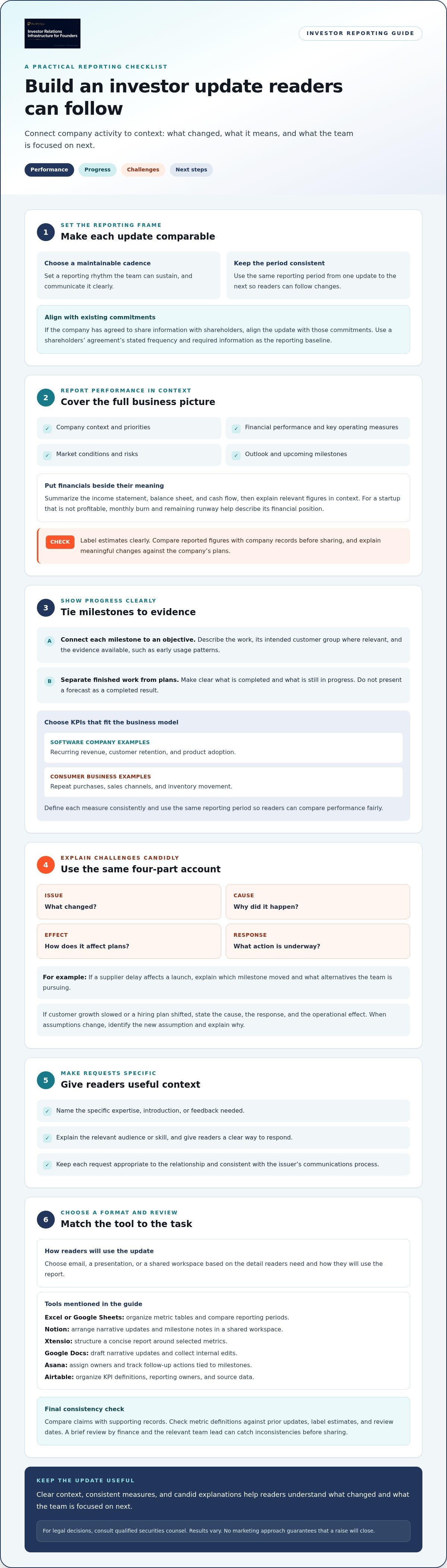
Customizing and sharing an investor report
Customize the emphasis, not the underlying facts. A current shareholder may need changes since the last update, while a prospective investor needs more company context. Keep definitions, reporting periods, and source data consistent across versions. This lets readers compare reports without mistaking audience-specific details for different performance claims.
Start by identifying the report’s audience and purpose. For an existing shareholder update, highlight material progress, changed assumptions, and upcoming decisions. For a general company overview, explain the business model before presenting detailed metrics. In both cases, label estimates and distinguish completed milestones from planned work.
Build a clear visual hierarchy with consistent fonts, descriptive headings, and readable charts or tables. A chart should identify its measure and period; a table should clarify units and comparisons. For example, label a trend by reporting period and explain a sharp movement beside it. Use print-ready margins so the file remains readable on screen and on paper.
Adjust the level of detail without changing the central record. A board member may need operating context, while a broader shareholder group may benefit from a concise summary. Keep key figures aligned across versions, then adjust explanations and supporting material. If one version omits a chart, ensure its narrative still accurately describes the underlying result.
Use tools that support review and controlled distribution. Microsoft Word works for drafting and applying consistent styles. Excel helps organize tables and prepare charts from source data. Adobe Acrobat is useful for reviewing a final PDF before sharing. Google Drive can store approved files with access settings suited to the intended recipients. Keep working drafts separate from the approved report.
Before distribution, follow a repeatable review sequence:
- Compare reported figures with the company’s source records.
- Check headings, chart labels, reporting periods, and document links.
- Ask finance and relevant team owners to review their sections.
- Export the approved version and inspect it on screen and in print layout.
- Share it through the intended channel, then retain the final copy.
For email distribution, use a clear subject line and identify the reporting period. For a shared workspace, limit access to the intended audience and avoid exposing internal drafts. Name the final file with the company and period so readers can find it later. If a correction is needed, send the revised version with a brief explanation of the change.
A disciplined sharing process protects accuracy and makes reports easier to use. Document who reviewed the report, which version was approved, and when it was distributed. These records help the team answer questions consistently and prepare the next update from a reliable baseline.
Pre-IPO Hype: Custom Investor CRM
Pre-IPO Hype provides investor relations infrastructure for Regulation CF and Regulation A+ raises. We are not a broker-dealer, funding portal, or investment adviser, and we do not offer, sell or recommend securities. This article is educational only and is not legal, tax or investment advice. Pre-IPO Hype fees are never tied to investment results. FWSC and Pre-IPO Hype are paid per form filled out and per meeting booked, with no commission, equity or share of the raise.
For founders preparing these raises, our support works alongside the issuer’s registered intermediary and qualified securities counsel. Our Custom Investor CRM supports lead scoring and attribution tracking.
This support can suit teams organizing campaign activity alongside recurring investor communications. Keep reporting accurate, consistent, and aligned with approved offering materials. Direct investors to the issuer’s registered intermediary or offering page for offering information.
Contact Pre-IPO Hype to discuss campaign support for your raise.
Make reporting part of your operating rhythm
A useful investor reporting template is more than a document. It can record how priorities, assumptions, and decisions evolve. Connect each update clearly to the company’s current operating plan. Over time, this discipline gives founders a practical way to explain change, not just report activity.
As a company prepares for a Regulation CF or Regulation A+ raise, investor communications should remain consistent with the issuer’s offering materials and review process. Coordinate reporting and campaign activity with the registered intermediary and qualified securities counsel. Rely on qualified securities counsel for legal decisions. Results vary, and no marketing approach guarantees that a raise will close.
Bring the next update into focus by deciding who owns each input, how figures are reviewed, and where the approved version is stored. A reliable process gives the team a stronger foundation for clear communication as the business develops.
Keep building a reporting practice that reflects the company accurately and helps readers understand what comes next.
Frequently Asked Questions
What Is an Investor Report?
An investor report is a dated communication that records company developments for current or prospective investors. It gives readers a reference point for understanding what changed during a specific reporting period. For example, a report can note a product launch, distinguish completed work from planned work, and explain the effect on upcoming priorities. Keep the approved version and supporting records together so the company can respond consistently to later questions.
How Often Should Startups Send Investor Reports?
Follow any reporting schedule set by a shareholder agreement; otherwise, choose a cadence the team can maintain. Monthly or quarterly updates are common. Match the schedule to the company’s reporting rhythm and review capacity. Set a recurring calendar date, assign owners for each input, and leave time for finance review before distribution. A consistent cutoff helps readers understand which period each update covers and makes internal preparation more predictable.
Disclaimer
Educational only. Not investment, tax, or legal advice. Pre-IPO Hype is investor relations infrastructure for Regulation CF and Regulation A+ raises. We are not a broker-dealer, funding portal, or investment adviser, and we do not offer or sell securities or make investment recommendations. Any securities offering is made only by the issuer, through its own offering documents and, where required, a registered intermediary.